Photo Calorie Counter App
Photo calorie counter
Snap your plate, see the calories.
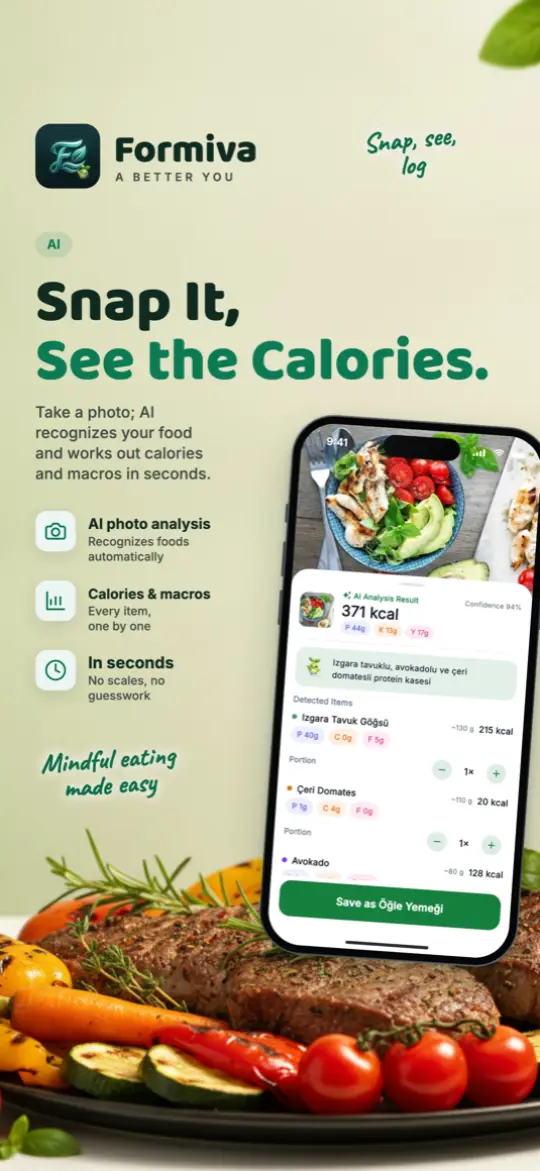
Snap a photo of your plate; AI recognizes your food and works out calories and macros in seconds. No scales, no guesswork. Try it now.
Free to download; core tracking is free.
Why Formiva?
Take a photo; AI recognizes your food and works out calories and macros in seconds.
Photo, label, barcode, text or voice; log your meal whichever way is easiest for you.
Calories and macros from your photo go straight to your diary; your remaining budget is always in view.
How it works
- Open the camera from the add-meal screen and take a photo of your plate.
- The AI separates the foods and shows estimated calories, protein, carbs and fat.
- Fix a portion or a food if needed, then save it to your diary with one tap.
Common questions
How accurate is photo calorie counting?
It is an estimate. Oil, sauces and hidden ingredients can’t be seen in a photo, so Formiva lets you edit every result before saving.
Does it know Turkish dishes?
Yes. Traditional Turkish dishes are a big part of the catalogue; you can browse them in our food guide without installing the app.
What if I can’t take a photo?
Scan a barcode, scan a restaurant QR menu, or type or say what you ate.
Free to download; core tracking is free.
Explore: Photo calorie counting guide · Turkish food calorie guide · Calorie calculator